Last week we told you Bulk Product Sync was "growing into something bigger." Today, that something is live: Bulk Product Sync with Google Sheets™ now runs on BPS Cloud, delivered through the exact same Google Workspace Marketplace listing you already know.
Rather than just tell you what changed, here's what it actually looks like — real screens, from a live install.
Install the add-on from any Google Sheet (Extensions ▸ Add-ons ▸ Get add-ons, search "Bulk Product Sync"), and a new BPS Cloud menu appears next to Help. This replaces the old plugin's admin screens entirely — everything happens from the sheet:

The full BPS Cloud menu — connect, sync, fetch, automate, and check status without leaving the sheet.
Click Connect Store and you get a single field: your store URL. That's it.
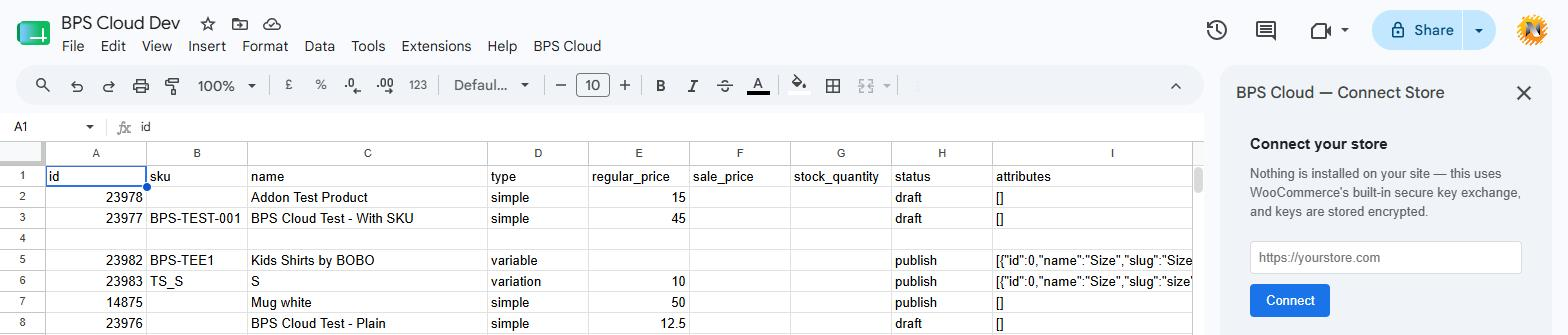
The Connect Store sidebar — the entire setup step for a brand new store.
Behind that one field is WooCommerce's own built-in secure key exchange (wc-auth) — the same handshake WooCommerce uses for its official mobile app. You're redirected to your own wp-admin to approve the connection, then bounced back. Nothing gets installed on your site, no code runs on your server, and your keys are stored encrypted. If you ever want to disconnect, that's one click too.
This is the part the old plugin got wrong. Update-by-SKU used to fail silently — you'd run a sync, it would say "done," and some rows just... didn't update, with no indication why.
BPS Cloud writes a real result back into two columns on every row, every time:

sync_status and sync_message — a real result on every row, not just an overall "done."
Matching now follows a strict order — an explicit product id, a stored link from a previous sync, or an exact SKU match — never a guess. If a SKU matches more than one product in your store, you get a clear per-row error instead of a silent duplicate. If ninety-nine rows sync and one fails, you'll know exactly which row and why.
The Automation menu item opens a sidebar for AutoFetch and scheduled AutoSync — set a cadence and direction (sheet → store or store → sheet), and it runs on schedule in the background, plus live updates pulled into your sheet the moment a product changes in your store. Both directions are built and tested to actually run, not just appear in a settings screen.
Your Google Sheet is still the way you work — nothing about the day-to-day changes. What's underneath it now is a proper backend built for reliability, instead of a single WordPress plugin doing everything on its own.
If you're already using the WordPress plugin, it isn't going anywhere — but BPS Cloud is where new development is happening, and where we'd recommend starting if you're connecting a store for the first time.
Open the Bulk Product Sync with Google Sheets listing on Google Workspace Marketplace, install it into any Google Sheet, and connect your WooCommerce store — no plugin required.
Questions? Contact us — we're listening.