If you're using our original Bulk Product Sync WordPress plugin, nothing is being taken away from you. It stays exactly where it is on WordPress.org, untouched, working the same way it always has. But new development — matching that never guesses, per-row sync results, real Automation — is happening in BPS Cloud, and moving over is a lot less work than it sounds like.
Open the BPS Cloud sidebar in a Google Sheet and click Connect. This is the same WooCommerce wc-auth key exchange the plugin uses today — you approve the connection from your own wp-admin, nothing installs on your site, and your existing plugin keeps running alongside it if you're not ready to remove it yet.
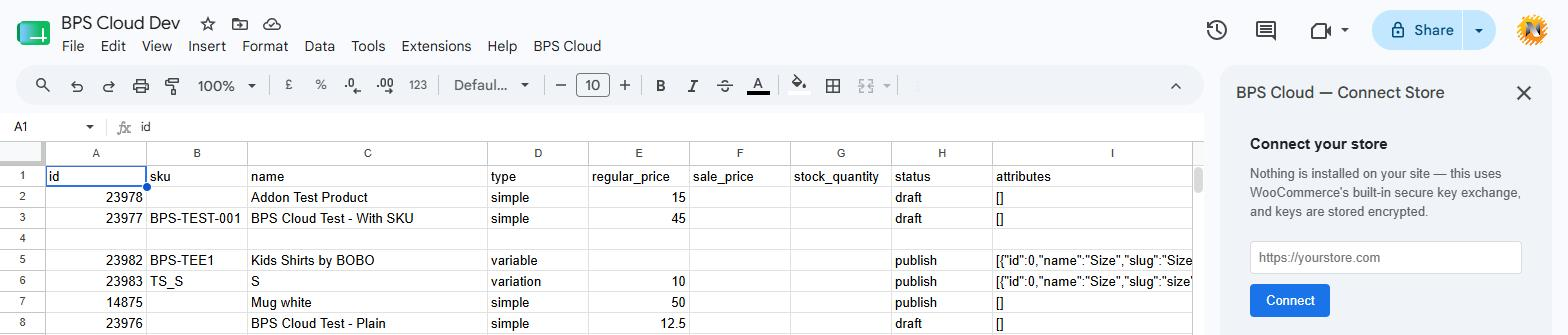
One field, then you're redirected to approve access from your own wp-admin — the same flow whether you're a new user or migrating.
Once connected, BPS Cloud re-links your existing catalog by SKU. It doesn't need you to re-map anything or start your product data over — if your products already have SKUs (and most real catalogs do), the matching engine finds and links them automatically the first time you sync.
The old plugin's menu was "BulkSync," with an Orders Manager, SKU updater, field manager, and a handful of Pro-gated features layered on over the years. BPS Cloud's menu is deliberately smaller: Connect, Sync, Fetch, Automation, Status. That's not a feature regression so much as a rebuild — the older feature surface grew organically and unevenly, and BPS Cloud's Phase 1 scope is the sync/fetch/automation core done properly, with the reliability work (matching precedence, per-row results, retry-safe automation) that the plugin never had built in from day one.
If you relied on a specific plugin feature outside that core set, it's worth checking before switching entirely — but for the great majority of bulk-edit workflows (pricing, stock, attributes, categories, at real catalog volume), BPS Cloud covers it, and covers it more reliably.
Three concrete reasons, not just "it's newer":
sync_status and sync_message columns tell you exactly what happened, including WooCommerce quirks like silently-rejected sale price updates that other tools miss entirely.BPS Cloud is free to install from the Google Workspace Marketplace. Read the full walkthrough of the bulk-edit workflow in our step-by-step guide, or see how the matching logic actually works in why we rebuilt SKU matching from scratch.
Questions about migrating a specific catalog? Contact us — or keep using the WordPress plugin as long as it works for you. It isn't going anywhere.